Sunday, April 24, 2016

[LeetCode] LRU Cache

One of straightforward implementation of LRUCache is to use JDK's LinkedHashMap. However to implement it correctly, overriding its removeOldestEntry() method is not enough.

We need to use the correct LinkedHashMap constructor with correct arguments to make sure it behaves as LRU cache. Below is the doc from JDK:

"A special constructor is provided to create a linked hash map whose order of iteration is the order in which its entries were last accessed, from least-recently accessed to most-recently (access-order). "

And here is the code which passed the LeetCode tests and beat 90% Java implementation in terms of the runtime.

Saturday, April 16, 2016

[LeetCode] House Robber III

LeetCode House Robber III 

Problem:
the thief has found himself a new place for his thievery again. There is only one entrance to this area, called the "root." Besides the root, each house has one and only one parent house. After a tour, the smart thief realized that "all houses in this place forms a binary tree". It will automatically contact the police if two directly-linked houses were broken into on the same night.
Determine the maximum amount of money the thief can rob tonight without alerting the police.

This is a Maximum Weight Independent Set Problem in disguise, which is NP-hard. However to find the max weight set in a tree is possible.

Given a node, if we use maxWith(node) denote the max weight with node in the set, maxWithout(node) denote the max weight without node in the set, max(node) is the max weight with the subtree rooted at node.

1. if node is in the solution, then maxWith(node) = sum of maxWithout(node.children) + node
2. if node is not in the solution, the maxWithout(node) = sum of max(node.child)

Then max(node) = max of maxWith(root), maxWithout(node)

This can be done using dynamic program to start the leaves first then go up to the tree to calculate the maxWithout() and max() for each node. To achieve this we use recursive post-order traversal.


Sunday, April 3, 2016

Data encoding, schema evolution and a case study

Data Encoding

When sending data over the wire or storing it in a disk, we need a way to encode the data into bytes. There are different ways to do this:

1. Use programming language specific serialization such as Java serialization or Python's pickle, which makes developers in other languages frown.

2. Use language agnostic formats such as XML or JSON, and we are particularly excited by JSON's simplicity. XML is too old school.

However unlike XML which has xml schema,  JSON is not a strictly defined format, even with JSON schema, which has a few drawbacks to make you bite your nails . First, it doesn’t differentiate integers from floating point, second, they are still verbose because field names and type information have to be explicitly represented in the serialized format. Lastly, the lack of documentation and structure makes consuming data in these formats more challenging because fields can be arbitrarily added or removed.
Updated: JSON Schema defines seven primitive types for JSON values:
array
A JSON array.
boolean
A JSON boolean.
integer
A JSON number without a fraction or exponent part.
number
Any JSON number. Number includes integer.
null
The JSON null value.
object
A JSON object.
string
A JSON string.

3. Using binary format.

One of the IBM mainframe i-series AS400/RPG uses the a binary data for record-based columnar like format, with predefined data type size and record size. But it may waste lots of space since every field and record has different sizes.

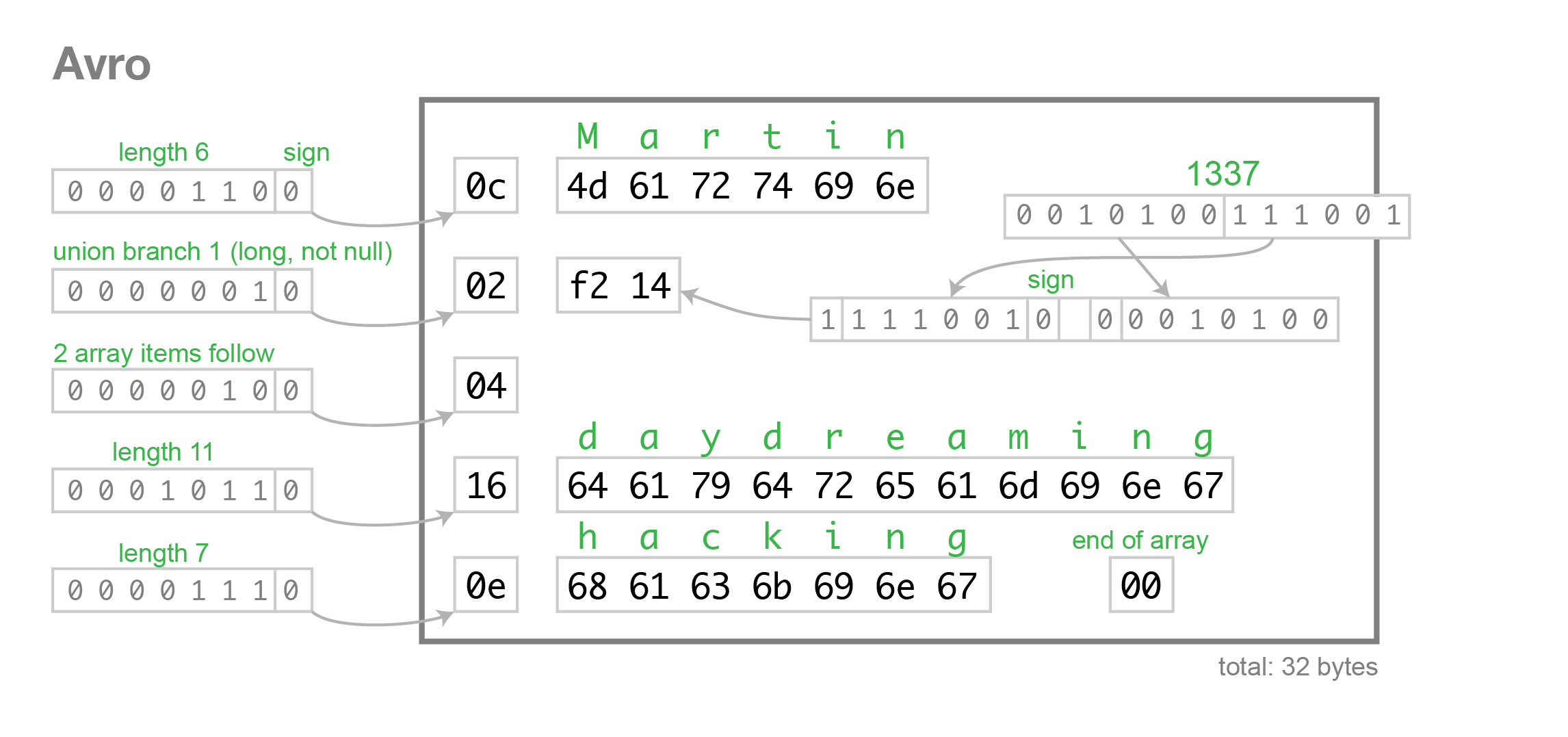
For example: [3, 27] is an JSON array containing the items 3 and 27, it could be encoded as the long value 2 (encoded as hex 04) followed by long values 3 and 27 (encoded as hex 06 36) terminated by zero:  04 06 36 00.

4. To describe all of the bytes in the above binary format, we need a document and contract between producer and consumer, or schema. Here comes the libraries include Thrift , Protocol Buffer and Avro

The below diagram illustrates the bytes encoding using Avro format.
Source: avro.png

Schema plays pivotal role here and is required during both data serialization but also data deserialization. Because the schema is provided at decoding time, metadata such as the field names don’t have to be explicitly encoded in the data. This makes the binary encoding of Avro data very compact.

Another benefit Avro schema brings is that for static type languages like Java, the serialization and deserialization code can be auto-generated from the schema.

Schema Evolution

One thing is never changed in software development is CHANGE itself,  in this case, the schema changes. Schema evolution is defined as how the application should behave when Avro schema is changed after data has been written to the store using the older versions.

Schema evolution is about data transformation. Avro specification itself has detailed information about how the data is handled when downstream (reader) schema is different from the upstream (writer) schema. When that happens, the data transformation from one schema to the other is performed.

Schema evolution is applied only during deserialization. If the reader schema is different from the value's writer schema, then the value is automatically modified during deserialization to conform to the reader schema. To do this, default values are used.

There are three common aspects of schema evolution: backward compatibility, forward compatibility, and full compatibility.

Let's consider two cases: add a field and remove a field.

To add a field, in order to support schema evolution, a default must be defined.

{"name" : "gender", "type" : "string" , "default" : "null"}]

When reader using old schema encounters this new field, the transformation will automatically drop this new field, this is called forward compatibility.

When reader using new schema encounters data without this new field, the transformation will automatically add this new field and set its value to null. This is called backward compatibility.

The same thing applies to remove case, which I leave it as an exercise to the readers.

Enum evolution

The intriguing part about schema evolution is the Enum evolution.  The following line is from Avro specification:
  • if the writer's symbol is not present in the reader's enum, then an error is signalled.
 This makes schema evolution for enum impossible, because we often need to add new values to the Enum field. And this turns out to be a long-term issue on Avro JIRA board: https://issues.apache.org/jira/browse/AVRO-1340. The proposal is actually simple:

"Use the default option to refer to one of enum values so that when a old reader encounters a enum ordinal it does not recognize, it can default to the optional schema provided one."

Basically always define a default value for enum like below:
{"type":"enum", "name":"color", "symbols":["UNKNOWN","RED", "GREEN",
"BLUE"], "default": "UNKNOWN" }
  
Lost in translation


 One interesting side effect from schema evolution is shown as below example:

Say we have two versions of schema: v1, v2, v2 has the new field called 'color' with default value of 'UNKNOWN'.

A v2 writer created a doc with color = RED.
A v1 reader parse this data, color field is removed and update the data store.
A v2 reader parse this data, color field is restored with value to 'UNKNOWN'!
 
Avro naming convention

Record, enums and fixed are named types. The name portion of a fullname, record field names, and enum symbols must:
  • start with [A-Za-z_]
  • subsequently contain only [A-Za-z0-9_]
The reason here is because when code-generation tool generates the code from schema, record and enum becomes the variable names. And in most of languages including Java, variable names can not have dash.

A Case Study

Armed with the above knowledge, let's do a case study. Saying we have a data store consists of Apache Gora and Kafka schema registry, allows us to store data set and register schema to support schema evolution, and data store will send out any new or updated data set to Kafka pipe which allows downstream consumers to consume the dataset.  Team A works on app a, which collects data and deposit it to data store, team B works on app b, which will listen to the pipe and fetch the data from data store and transform it and put in back to data store, the team A's app a also need to read this data back and make any change and put it back again. However Team B's changes should be preserved as much as we can since it is more a downstream application in this pipeline. 

Approach 1:

App A with its own schema a, app B with its own schema b.

At the beginning, App A has reader/writer for schema a.1, b.1, App B has reader/writer for schema a.1 and b.1.

Considering this case, Team B add new fields to its schema b.1, update schema to b.2 and update its reader/writer to b.2.  app A will read this data with reader/writer for b.1, the new field is dropped, write it to a.1, app B read updated data from a.1 now without this new fields to b.2, app B either won't be able to write this data back to b.2 or has to write a data transformation logic by itself to set the value to default value.

The case of dropping fields is the similar. App A and App B is loosely coupled, but we lost the benefit of schema evolution brought by out-of-box of the platform. Often times team end up to coordinate each other to update the two schema to avoid this 'lost in translation' case.

Approach 2:

App A has its own schema, defines the payload as json string with actually confirm to schema B and along with its schema version no, which app B can retrieve and deposit to datastore.

When app B read the data from app A, it not only read the payload but also use correct writer with right version no b.1 to deposit the data to store without losing any original data. So this approach allows two application evolve around the same schema, to avoid the lost in translation case, team A can always use the latest version of schema b.

The drawback of the approach is that we need to make sure the json payload is validated against schema b.1 and now we store data as json which lose the benefit of Avro serialization. 


References:
 
https://martin.kleppmann.com/2012/12/05/schema-evolution-in-avro-protocol-buffers-thrift.html

Friday, April 1, 2016

[LeetCode] Palindrome Linked List

This is classic leetcode problem: https://leetcode.com/problems/palindrome-linked-list/

Given a singly linked list, determine if it is a palindrome.
Simple solution is to go through the linked list, and put all node reference on a stack, then loop through the stack and linked list at the same time to compare the values. 

public boolean isPalindrome(ListNode head) {
        Stack<Integer> s = new Stack<>();
        ListNode n = head;
        while(n!=null){
            s.push(n.val);
            n = n.next;
        }
        while(head!=null){
            if(head.val != s.pop())
                return false;
            head = head.next;    
        }
        return true;
    }


Follow up:
Could you do it in O(n) time and O(1) space?
This can be done by reversing the half of the linked list. First of all, we need to find the middle point of the list, then reverse the second half, and compare the first half from head and second half from the tail. 


Saturday, March 19, 2016

[LeetCode] Counting Bits

This problem is from  leetcode 

Given a non negative integer number num. For every numbers i in the range 0 ≤ i ≤ num calculate the number of 1's in their binary representation and return them as an array.
Example:
For num = 5 you should return [0,1,1,2,1,2].

Let's list the some examples, left column are the numbers, the right column are the number of bits for each number.

0 0
1 1 <-- go back to 1
2 1 <-- go back to 1
3 2
4 1 <-- go back to 1
5 2
6 2
7 3
8 1 <-- go back to 1
.
.
.
16 1 <-- go back to 1

First of all, we observe for every 2^n number, the number of bits will be 1. Now we need to figure out the number of bits for each number between the 2^(n-1) and 2^n. Using function bits(int num) as example, we can see
bits(2)=1
bits(3) = bits(2) + bits(3-2)
bits(4) = 1
bits(5) = bits(4) + bits(5-4)
bits(6) = bits(4) + bits(6-4)
bits(7) = bits(4) + bits(7-4)
bits(8) = 1

Got it?


Learning python: the case of logger

Recently I came across a python codebase like below: 

Main.py
import A as a
import B as b

logger = logging.getLogger(__name__)
a.logger = logger
b.logger = logger

A.py

 logger = None # set from main

B.py

 logger = None # set from main

What is the problem with that? What is good practice to use logger? To answer these questions, let's look at how python logger works. Python logging module is influenced by log4j java logging framework. So we will see many things can be applied to java logging as well.

Logging module class diagram

Each logger instance can have multiple handlers, each handler can have one formatter which contains the log message format. Each logger has a parent pointer to its parent. Below is the python logger module's internal class diagram.


- The loggers are arranged as hierarchy tree based on the name's dotty namespace hierarchies. The top is root logger. For example, logger named 'a.b.c''s parent is a logger named 'a.b' whose parent is logger named 'a' whose parent is the root logger.

Logging configuration

The root logger can be configured by basicConfig() method and can only be configured once. It does basic configuration for the logging system. The function does nothing if the root logger already has handler configured. It is a convenience method intended for use by simple script to do one-shot configuration of the logging package.

FORMAT = "[%(filename)s:%(lineno)s - %(funcName)10s() ] %(message)s"
logging.basicConfig(format=FORMAT)

ANOTHER_FORMAT = "[%(filename)s:%(lineno)s] %(message)s"
logging.basicConfig(format=ANOTHER_FORMAT)

The above second call won't have any effect.

Logger creation

Logger is obtained by a factory method. 

logger = logging.getLogger(__name__)

The above method will register logger in an internal logger instance cache keyed by the module name. It returns a logger with the specified name, creating it if necessary. If no name is specified, return the root logger.

Thread safety

Both method getLogger and basicConfig are thread safe by acquiring a lock. Below is the source code from python 2.7

#_lock is used to serialize access to shared data structures in this module.
#This needs to be an RLock because fileConfig() creates and configures
#Handlers, and so might arbitrary user threads. Since Handler code updates the
#shared dictionary _handlers, it needs to acquire the lock. But if configuring,
#the lock would already have been acquired - so we need an RLock.
#The same argument applies to Loggers and Manager.loggerDict.
#
if thread:
    _lock = threading.RLock()
else:
    _lock = None

def _acquireLock():
    """
    Acquire the module-level lock for serializing access to shared data.

    This should be released with _releaseLock().
    """
    if _lock:
        _lock.acquire()

def _releaseLock():
    """
    Release the module-level lock acquired by calling _acquireLock().
    """
    if _lock:
        _lock.release()


Log message propagation

The most important, log messages are bubbled up, just like event bubbling in browser, from children all the way to root.

Asynchronized logging

One of most import aspects of logging inside web application is the logging should be asynchronized, since I/O operation is blocking. The standard python logging module doesn't have async handler.

Initialize logger

We can initialize logger at the module level like the above example or at the class instance level.

A.py
import logging
logger = None
class A(object):
    def __init__(self, params):
    logger = logging.getLogger(__name__)


The benefit of setting logger at the class level is that the logger is lazy initialized only when the class A is created and used.     

So the problem with the approach mentioned at the beginning is that all python modules use the same logger, there is no hierarchy. We lose the benefit of attaching different log handler to the loggers and message propagation.

Conclusion

As conclusion let's look at the following example,

Main.py 
import logging
import A

rootLogger = logging.getLogger()
rootLogger.setLevel(logging.DEBUG)
rootLogger.addHandler(logging.FileHandler("main.log"))


A.py 
logger = logging.getLogger(__name__)
logger.setLevellogging.DEBUG)
logger.addHandlerlogging.FileHandler("app.log"))

logger.info('logging message at A')

What will be the end result? The message will appear in both logs! 

Monday, March 14, 2016

Pascal's Triangle - LeetCode

I have not done any coding problem recently. Here is simple problem with a simple solution. https://leetcode.com/problems/pascals-triangle/

Given numRows, generate the first numRows of Pascal's triangle.
For example, given numRows = 5,
Return

[
     [1],
    [1,1],
   [1,2,1],
  [1,3,3,1],
 [1,4,6,4,1]
]


The idea here is every row in the triangle is generated based on the row above it. For example, the 3rd row [1, 2, 1] can be generated by going through each item in the row [1, 1], add pre number or 0 for the first item and itself, so it will be 0+1 = 1, 1+1=2, then append 1 in the list.

The code is pretty straightforward.